When I am consulting with small business owners or finance managers, asset management is usually one of the first topics that brings up a lot of dread. People buy equipment, vehicles, or technology, and then they realize they have to track how that value decreases over time for tax and accounting purposes.
In my 12 years of working with scheduling and asset systems across different business environments, I have seen too many owners try to track thousands of dollars in equipment using messy notes or overly complicated accounting software they do not really understand. That is a quick way to make mistakes on your balance sheet. I built this collection of free depreciation schedule templates to give you a clean, reliable framework to track asset decline year over year.
Every template here is entirely free to download in MS Word, MS Excel, and print-ready PDF formats—with no registration or hidden paywalls.
Built for practical bookkeeping accuracy
A useful asset tracking layout does not just list purchase prices. It needs to give you an immediate look at current book value versus accumulated depreciation. The thing most people do not realize until they sit down to do their taxes is that different types of assets require different calculation frameworks.
I know from direct experience that a straight-line calculation works beautifully for office furniture, but a declining balance method might be necessary for IT hardware or company vehicles. Because of that, these layouts feature optimized columns designed specifically for clear bookkeeping:
- Asset descriptions: Clear rows to identify the asset name, serial number, and purchase date.
- Cost baseline fields: Dedicated spaces for the initial cost, salvage value (what it is worth at the end of its life), and total depreciable basis.
- Useful life markers: Clear inputs to track the number of years the asset is expected to remain operational.
- Annual expense tracking: Sequential columns to view accumulated depreciation and net book value year by year.
The column widths are pre-set—pre-set to ensure everything fits cleanly onto a single spreadsheet view or printed page—so you will not have to waste your afternoon fixing broken rows. I have used standard, highly professional formatting throughout the files so they are ready to hand directly to your CPA or accountant.
Free Depreciation Schedule Templates
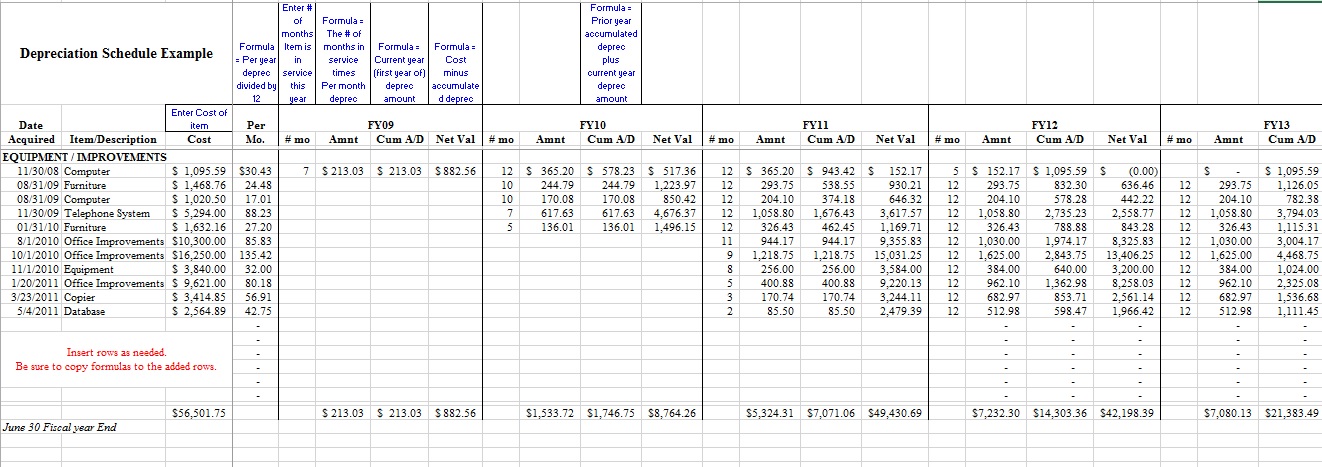
Check out the following Depreciation Schedule Excel Sheet to assist you.


Depreciation schedules are mostly created by professional accountants using different methods. The following tips will help you in creating a depreciation schedule with ease.
- First of all, choose an appropriate method of calculating depreciation. There are lots of different methods however, the three very common and widely used depreciation methods are the straight-line method, the sum of year method, and the declining balance method. All these methods are good and effective however the straight-line method is the simplest and easiest method.
- List all the different types of assets for which you want to create a depreciation schedule. It is convenient to create separate schedules for each asset. You can create separate schedules in one Excel book using separate sheets or can even create separate files.
- Open a spreadsheet program and create a depreciation table by writing different headings in the top row including the year (end of), the value of assets, Depreciation expenses, and cumulative Depreciation.
- Type all the relative information under each category. Under the heading of the year, write the years from the current year to the year you want to make depreciation. For example, if the duration of the depreciation is 3 years and the current year is 2005, the column will include the years 2005, 2006, 2007, and 2008.
- In the value of asset column, type the full value of the asset. In the remaining two rows type “0”.
- In the next year’s row for the first year, in the column of “depreciation expanse”, write the total amount that you want to depreciate. First, calculate the amount using your preferred method. Subtract that particular value from the total amount of assets and write the difference in the column of “value of the asset”.
- Similarly, fill all the columns using the appropriate numbers that you get from the calculations.
Additional to all these things, also include the information that is important for the determination of annual depreciation including original purchase date, recovery period cost basis, etc. The purpose of using a depreciation schedule is more than tracking your accounting books. These schedules will help you assess the age of your assets and will tell you what will be the perfect time to replace your asset without getting any kind of loss.
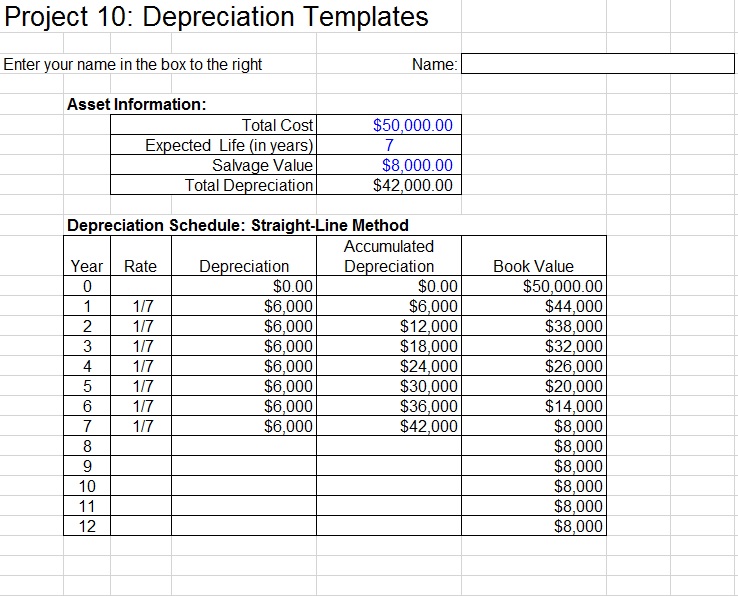
Here is a preview of another Depreciation Schedule Template,